Pull Requests
Point Fabric at a pull request and it reads the diff through your connected repository, then keeps exactly what it read — so you can see what a review would be based on.
Fabric can read a pull request from a repository you have already connected, keep the diff it fetched, and then tell you what that change is missing test coverage for.
The reading and the reviewing are separate steps on purpose. A review that says a pull request is untested is only worth acting on if you can check what the reviewer actually saw — whether it had the whole change or half of it, the right commit or a stale one. So Fabric reads first, shows you the diff, and only reviews when you ask.
Where to find it. Project ▸ Testing ▸ Pull requests. The tab is part of the Testing feature and appears only when that feature is enabled for your deployment — if Testing is missing entirely, ask whoever administers your Fabric instance.
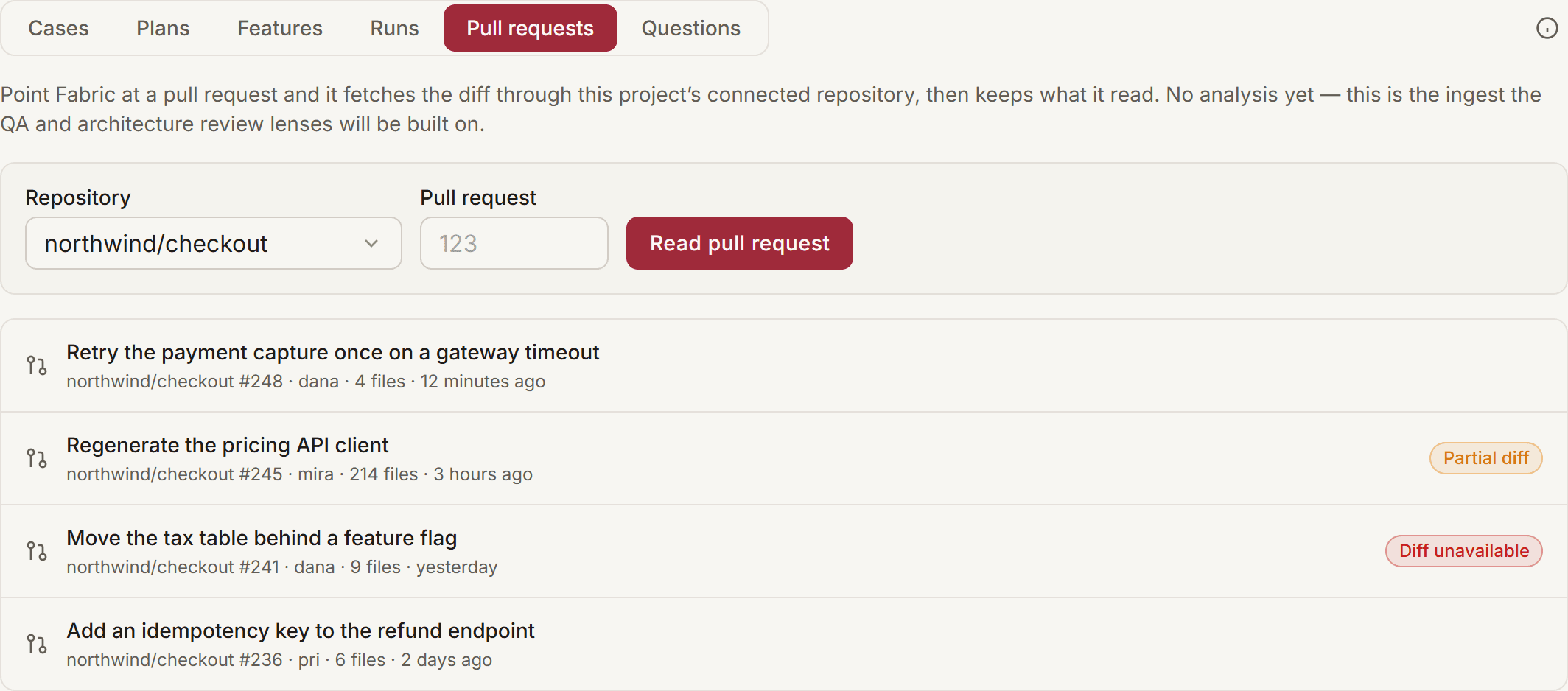
What you need first
One connected repository on the project — GitHub, GitLab or Azure DevOps. Fabric reads the pull request using the same credential the project is already connected with — there is nothing new to authorise and no second token to manage.
All three hosts, one flow. GitLab calls it a merge request and numbers it !123; Azure DevOps calls it a pull request. Fabric reads, reviews and comments on all three the same way, and the repository picker offers every repository the project has connected.
The one thing still specific to GitHub is the webhook that reviews every pull request automatically. On GitLab and Azure DevOps, start each review yourself from this segment.
Azure DevOps reads at most 60 changed files. Azure has no bulk diff endpoint, so each file costs its own request. A pull request touching more than 60 is read up to that point and marked Partial diff, exactly like one that exceeds the size limit — it is never presented as a whole change.
If the repository's credential has expired or been revoked, the read is refused with "No usable credential for this repository". Reconnect it under Settings ▸ Repositories and try again.
Read a pull request
Open the Pull requests segment
Go to Project ▸ Testing and choose Pull requests in the segmented control.
Pick the repository and enter the number
Choose one of the project's connected repositories and type the pull request number — the number in its URL, not the branch name. On GitLab that is the merge request's ! number. If the project has exactly one repository, it is selected for you.
Press Read pull request
Fabric fetches the pull request's title, author, commit range and changed-file count, then its unified diff. The diff opens as soon as the read finishes.
Reading a pull request needs permission to edit the project's test cases. A member with read-only access sees the list of what has already been read, but no read control — because the read spends an API call against your organisation's credential, and that is not a read-only action.
What gets stored
For each read, Fabric keeps:
| Field | Why it's there |
|---|---|
| Repository, number, title, author | Identifies the pull request without another API call |
| Head and base commit | The exact commit range the diff covers |
| Changed-file count | Reported by the host, so it can be compared against the diff |
| The unified diff | The text any later review reasons over |
Nothing else. Fabric does not clone the repository, does not read files the pull request did not touch, and posts nothing back to the host unless you press Post to pull request.
Once you review it, the findings are stored against that read too — with the model that produced them, where a model was involved.
Re-reading the same commit replaces that read; a new commit is a new read. If you read pull request #42, the author pushes a fix, and you read it again, you get a second entry — because it is genuinely a different change. Reading the same commit twice updates the existing entry instead of adding a duplicate.
Very large pull requests are truncated, and say so
Fabric stores up to 400 KB of diff per read. A pull request that exceeds that — a lockfile refresh, a regenerated client, a bulk rename — is stored up to the limit and marked Partial diff in the list, with a banner above the diff itself.
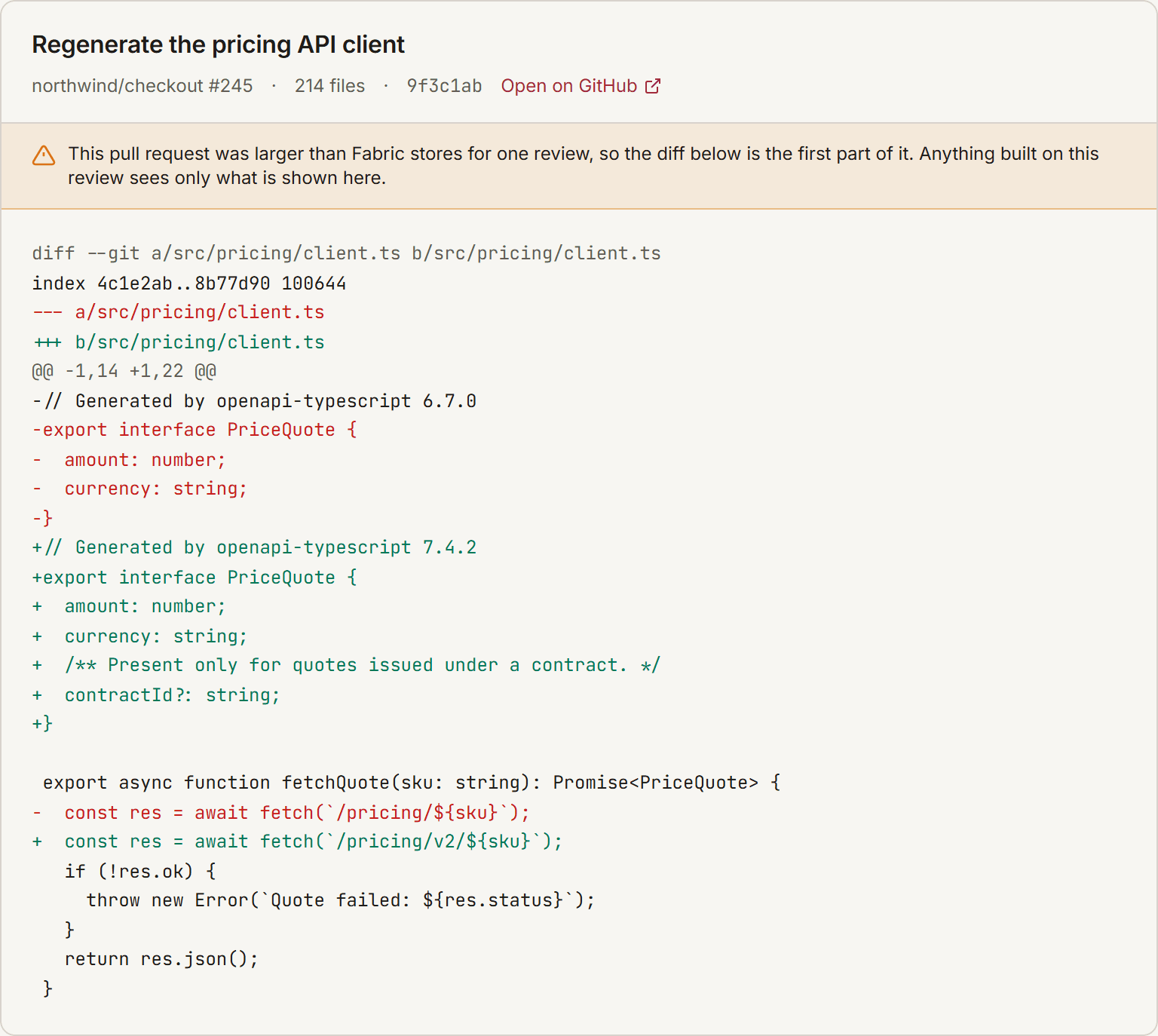
A partial read is never presented as a complete one. The mark exists so that nothing built on this read can imply it saw the whole change. If you need full coverage of a very large pull request, split it — the same advice that makes it reviewable by a person.
If Fabric reads the pull request's details but the host does not return a diff, the entry is recorded as Diff unavailable with the reason, rather than as a review of an empty change. "There were no changes" and "we could not see the changes" are different facts, and the list distinguishes them.
It is recorded in the audit log
Three events are written to the audit log:
| Action | When |
|---|---|
project.pull_request.read | Fabric fetched a pull request — who asked, which repository, which commit, whether the diff was truncated |
project.pull_request.reviewed | A lens ran over a read pull request — how many findings survived, and how many were discarded as ungrounded |
project.pull_request.finding_judged | Someone accepted or dismissed a finding |
This is Fabric reaching out of your workspace with your own credential and pulling your source code in, so it is an event your security review can filter for. The audit entry records what was read — it never contains the diff itself or the credential.
Review it for test coverage
Open a read pull request and press Review for test coverage. Fabric puts the diff in front of a model alongside something a general-purpose reviewer does not have: your project's features, their acceptance criteria, and the titles of the test cases already linked to each one. The question it asks is narrow — what behaviour does this change introduce or alter that no existing case covers?
Each finding carries a severity, what a case for it would assert, and — where it applies — the file and line in the diff plus the acceptance criterion it concerns.
The review follows your project's testing depth. A Light project gets a lighter review — gaps in functional and acceptance-level coverage only, capped at four findings — because a lighter tier is a deliberate choice about scope, not an oversight for the review to correct. Standard adds integration and end-to-end gaps; Enterprise adds security, performance and accessibility where the change touches them. It reads the same Strategy & depth setting the test-case drafter reads, so one setting means one thing. See Testing settings.
"No coverage gaps found" is stated explicitly, with a timestamp. An empty list that could equally mean "not reviewed yet" is reassurance nobody earned, so the panel always says which of the two it is.
Findings are advisory. Fabric files nothing. Accept records that a gap is real without committing to a work item; Dismiss asks why — not correct, won't fix, out of scope, or already covered. Only not correct counts towards the lens's false-positive rate; the other three record that a correct finding went unactioned, which is not the lens being wrong. Both are stored, so they are a judgement on the record rather than a way to hide a row, and a judgement survives re-running the lens.
Findings that cite something Fabric never saw are discarded
A model asked about a diff will sometimes name a file that is not in it, or an acceptance criterion the feature does not have. Fabric checks every finding against what it actually holds and throws away the ones that do not survive:
| Claim | What happens |
|---|---|
| A file path that is not in this change | The finding is dropped — it is about code the review never saw |
| A feature identifier that is not this project's | The feature link is removed; the observation is kept |
| A criterion beyond the end of that feature's criteria | The criterion reference is removed; the observation is kept |
| A line the change did not add | The line is removed; the file and the observation are kept |
This runs in Fabric's own code, not as an instruction in the prompt, so it holds even if your team rewrites the prompt in the Prompt Library. When findings are discarded you are told how many.
A very large change is reviewed in part. The model sees up to 200 KB of diff — less than the 400 KB Fabric stores — and is told when it is only looking at a portion, so it does not report the half it cannot see as untested. Most pull requests are nowhere near this: across 25 consecutive merged pull requests in Fabric's own repository the median diff was 16 KB and the largest 182 KB. What does exceed it is the mechanical change — a regenerated client, a lockfile refresh, a bulk rename — and those are worth splitting out of a reviewable change anyway.
Tune what the lens looks for
The prompt behind it is an editable binding: Prompt Library ▸ PR review — QA lens. Edit it to bias the review toward the gaps your team cares about. It cannot widen what the lens is allowed to cite — the discarding above is enforced regardless.
Check it for circular imports
Check circular imports answers a different question: does this change sit inside a cycle of files that import each other?
It reports one thing, computed: files that import each other in a cycle. This involves no AI at all. Fabric computes it from the import graph the Atlas analysis already built for your repository — the same graph the code map is drawn from. A cycle either exists in that graph or it does not, so there is nothing here to be confidently wrong about.
The lens only reports what your own repository establishes. A cycle is a property of your import graph and of nothing else, which is why it can be stated as fact rather than as an opinion. Rules that would need to assume something about your project's layout or conventions are deliberately absent — a review that guesses is worse than one that says less.
Only cycles your change is actually in are reported. A repository that has accumulated cycles elsewhere is a real problem, but it is not this pull request's finding, and attaching it here is how a review list becomes something people learn to skim past. When there are more cycles in the repository than in your change, Fabric tells you both numbers so you can see the difference.
Each finding names the files in the cycle, gives one concrete path round it (a → b → c → a), says which of them this change touches, and notes that breaking any single edge in that path is enough. Severity comes from size: two files importing each other is a local tangle, a larger knot is a module boundary that has stopped existing.
This needs an indexed repository. If Atlas has never analysed the project, Fabric says so rather than reporting "no problems found" — "we have never mapped your imports" and "your imports are fine" are different facts. Run an analysis from the Atlas tab first.
Post a review back to the pull request
A review that lives only in Fabric reaches whoever opens Fabric. The people who act on it are on the pull request, so Post to pull request writes the findings there as one comment.
The button appears once a lens has run — posting from a review nobody ran would publish reassurance nobody earned. Press it again after a later run and it edits the same comment rather than adding a second, so a busy pull request does not collect one per push. Findings someone dismissed inside Fabric are left out: a withdrawn verdict should not reappear in front of the team.
The comment blocks nothing. It is a comment, not a status check, and no merge waits on it.
Your connection needs write access. Reading a pull request needs read access; commenting needs write. If the credential the repository was connected with can only read, Fabric says so rather than failing quietly: "The connected credential is not allowed to comment on this repository." Fix it where the credential lives — see Giving Fabric write access below.
Review every pull request automatically
Off by default. A project can switch on Review every pull request automatically in Testing settings, and from then on Fabric reviews each pull request as it is opened or updated and posts the result.
What it does, and what it deliberately does not:
- Runs on opened, reopened, new commits, and a draft being marked ready. A review of the first push is stale the moment somebody addresses it, so a new push re-runs and edits the existing comment.
- Skips drafts, but not forever. A change its author has marked unfinished is not asking for an opinion yet — and when they press Ready for review, Fabric reviews it then. (Before, a pull request opened as a draft was never reviewed at all, because GitHub sends no "opened" event when it becomes ready.)
- One comment per pull request, edited in place. Later pushes update that comment rather than adding another.
- Runs only the lenses that project enabled. Switching the QA lens off leaves the architecture lens running, and vice versa.
- Never blocks a merge, and never fails your pipeline. It is not a status check.
- Costs a generation per pull request while the QA lens is on, because that lens asks a model. The architecture lens is computed and costs nothing.
Connect the webhook
Fabric has to be told when a pull request changes. This is one webhook per GitHub repository.
The webhook is per project, and the URL carries the project id.
GitHub — repository Settings ▸ Webhooks ▸ Add webhook:
| Field | Value |
|---|---|
| Payload URL | https://<your-fabric-host>/api/webhooks/github/pull-request/<projectId> |
| Content type | application/json |
| Secret | your project's webhook secret, from Testing settings |
| Events | Let me select individual events ▸ Pull requests only |
An older shared URL has been retired. /api/webhooks/github/pull-request,
with no project in the path, answers 410 Gone. It was authenticated by a single
GITHUB_WEBHOOK_SECRET shared across the whole deployment — a value every admin
who connects a repository is told — so a delivery signed with it could name any
repository and did not identify who sent it. If a repository still points at that
URL, move it to the per-project one above; GitHub's Recent Deliveries tab will
show the 410 until you do.
Save, then switch on Review every pull request automatically for the project.
GitHub's own Recent Deliveries tab shows each attempt and Fabric's answer, so
a 200 with "handled": true means it ran.
GitLab and Azure DevOps have no webhook yet. Reading a pull request, reviewing it and posting the review back all work on both — it is only the automatic trigger that is GitHub today. Start those reviews from the Pull requests segment.
What Fabric answers, and why it is always 200
A webhook that returns an error teaches the platform to retry, then throttle,
then disable the delivery — so a repository that is simply not yours must not
produce a failure. Fabric answers 200 with a reason instead:
| Reason | Meaning |
|---|---|
handled: true | The review ran |
repository-not-connected | No project has this repository connected |
auto-review-off | The project has not switched automatic review on |
action-not-reviewed | An event that changes no code, such as a label |
draft | The pull request is a draft |
invalid-signature | The secret does not match — answered 401, deliberately |
webhook-not-configured | That project has no webhook secret yet — answered 401 |
secret-undecryptable | The project's stored secret cannot be read, which means the deployment's encryption key changed — answered 401, and logged for an operator |
rate-limited | Too many deliveries from one sender for one project — answered 429 with Retry-After |
payload-too-large | The body exceeds 1 MB — answered 413. A pull_request payload is far under this |
projects in the same response says how many reviews the delivery actually
started, so a delivery that did nothing is distinguishable from one that did.
Giving Fabric write access
Posting a comment needs write access to pull requests. Where you grant it depends on how the repository was connected, which you can see in Settings ▸ Repositories.
Connected through a GitHub App (the usual case): the App's own permissions need Pull requests: Read and write, and each installation has to approve the change afterwards. Granting it on the App alone does nothing until then — the App page will look correct while every token still carries the old access.
Connected with a personal access token: reconnect the repository with a token
that carries write access to pull requests. A fine-grained GitHub token needs
Pull requests: Read and write on that repository. A GitLab token needs the
api scope — read_api reads a merge request perfectly well but cannot write a
note, which is the same trap as starting a pipeline.
An Azure DevOps PAT needs write access to code, not the read-only scope: a
read-only PAT reads the pull request and is then refused on the comment.
What this does not do yet
Being explicit, because the page name invites more than is here:
- Automatic review is GitHub only. GitLab and Azure DevOps repositories can be read, reviewed and commented on exactly like GitHub ones, but the webhook that starts a review on every push exists for GitHub today. On the other two, press the button.
- No inline comments. The review is one summary comment, not a note on each line. Findings name a file and, where it can be verified against the diff, a line.
- No test cases created for you. A finding tells you what a case would assert; writing it is still a person's call, from the Cases segment.
- No dependency-declaration checking. Whether a package imports something it has not declared is a real question, and answering it correctly needs your repository's own manifests. It is not checked today.
Either lens can be switched off per project — see Testing settings.
Next Steps
CI Test Results
Pull automated test results from GitHub Actions, GitLab CI, and Azure DevOps into Fabric, link them to your test cases, and see what broke without opening your CI dashboard.
Testing settings
Choose how much testing a project gets — how deep test cases go, whether Fabric drafts them at all, which environments runs target, and how often CI results are pulled in.