A feature's Testing tab
The readiness verdict for one feature — coverage against its acceptance criteria, traceability, warnings, CI results and sign-off.
Open a feature and switch to its Testing tab. Where the project's Testing tab answers "what is the state of the suite?", this one answers a narrower and more useful question: is this feature ready to sign off?
Everything on the tab is an input to that question. The tab answers it directly rather than leaving you to assemble it.
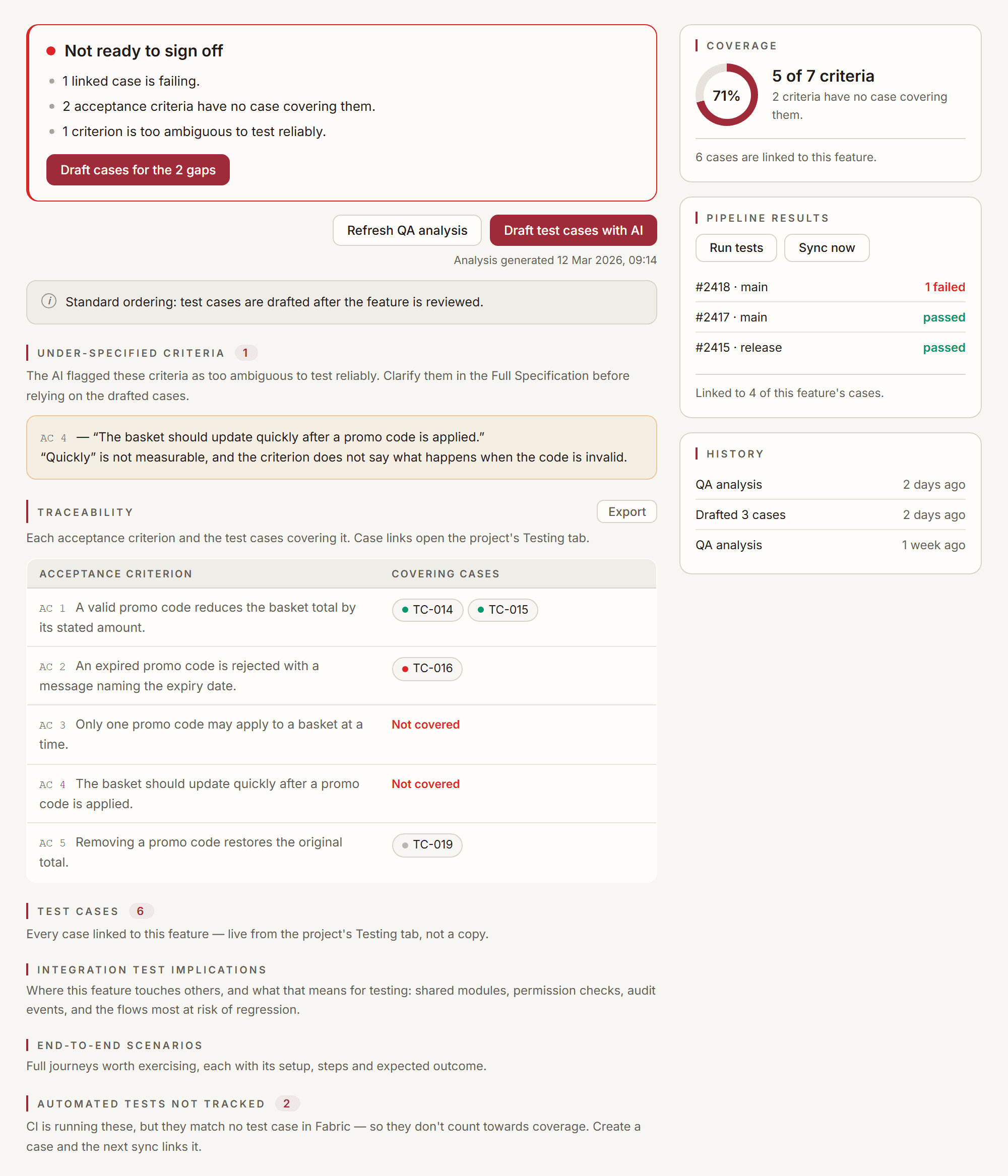
The verdict
The card at the top states one of five things:
| Verdict | What it means |
|---|---|
| Not ready to sign off | Something is a known defect or an untested criterion — a failing linked case, or a criterion with no case at all |
| Signable, with caveats | Nothing is failing or uncovered, but the picture is imperfect — ambiguous criteria, or a QA analysis that predates the current spec |
| Ready to sign off | No reason found against it |
| Coverage looks clean, but not all cases are loaded | The linked-case list is paginated and incomplete, so a clean reading cannot be trusted yet |
| Nothing to test against yet | No acceptance criteria have been parsed from the specification |
It also lists why, in the order worth acting on:
- failing cases — a known defect
- uncovered criteria — an unknown
- ambiguous criteria — untestable as written
- missing QA analysis — none has ever been generated
- stale QA analysis — it predates the current specification
Failing outranks uncovered deliberately. A criterion nobody wrote a case for is an unknown; a criterion whose case fails is a known defect, and a known defect is the more urgent of the two.
Staleness is never dropped from the list, even when everything else is green. It is the reason a page that looks clean can be describing a specification that no longer exists.
Coverage
The coverage figure counts acceptance criteria, not cases. Ten cases written against one criterion is not coverage; it is ten cases against one criterion, and a percentage over case count would call that a finished feature. The ring shows how many criteria have at least one case covering them, and the line under it says how many still have none.
The linked-case count is shown separately, and says so when not all of them are loaded.
Traceability
Each acceptance criterion — labelled AC 1, AC 2 and so on, the same numbering the drafter uses — and the cases covering it. A criterion with nothing against it is marked Not covered.
Below it, two lists that exist because coverage can fail in both directions:
- Not mapped to a criterion — cases linked to this feature that no criterion claims. Usually fine, sometimes a case that outlived the criterion it was written for.
- Automated tests not tracked — tests your CI is genuinely running that match no case in Fabric. They do not count towards coverage: Fabric will not credit you for a test it cannot tie to a requirement. Create a case and the next sync links it.
Export on the section heading downloads the matrix.
How Fabric splits your acceptance criteria
The rows come from the feature's Full Specification, and Fabric recognises three shapes:
- A list — bulleted or numbered. Each top-level item is one criterion; indented lines and wrapped text belong to the item above them.
AC Nmarkers — a line opening withAC1 -,AC 2:orAC3.starts a criterion, for specs that carry the numbering in the prose instead of in list markers. The marker has to start the line and be followed by text on the same line, so a sentence that happens to mention "AC 3." mid-paragraph is not treated as a new criterion.- Paragraphs — when the criteria use neither of the above (blank-line-separated Given/When/Then blocks, for example), each paragraph becomes a criterion.
If your criteria are written as one unbroken block of prose, Fabric has nothing to split on and the matrix shows a single row. Putting each criterion on its own list item or AC N line gives you a row — and a coverage warning — per criterion.
Under-specified criteria
Criteria the QA analysis flagged as too ambiguous to test reliably.
A criterion nobody can write a reliable case for will produce cases that pass while the requirement goes unmet. Clarify it in the Full Specification before trusting the cases drafted from it.
On a project using TDD ordering, two extra pieces of evidence appear here, because the cases were written before this review ran:
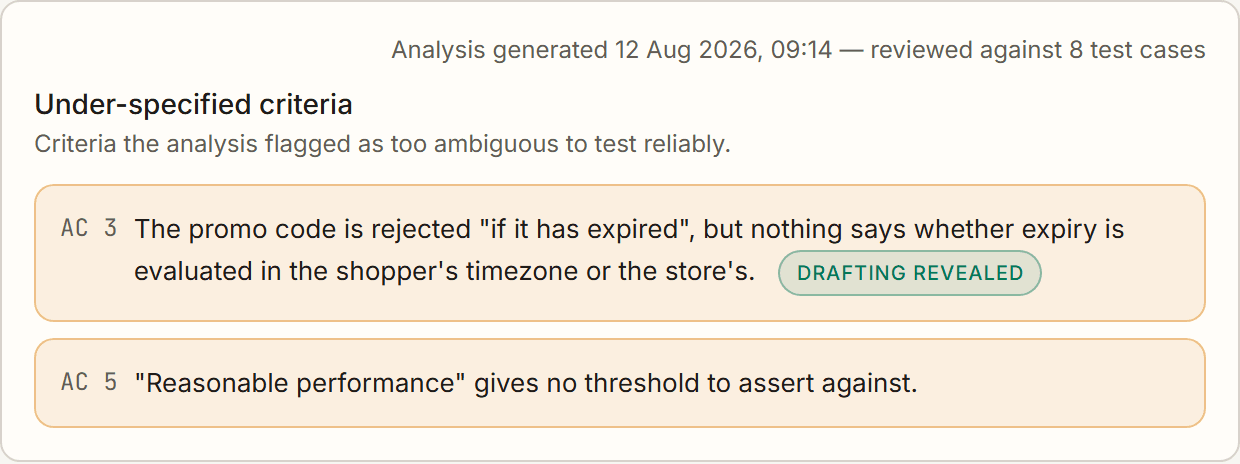
- the timestamp line says how many test cases the review read, so you can tell a review that considered the cases from one that did not;
- a warning carries a Drafting revealed chip when writing the cases is what exposed it, rather than the criterion being vague on its own terms.
That chip is the test-first ordering paying for itself: it marks a specification gap found while the cost of fixing it was still a sentence, not a rebuild. Neither appears under standard ordering, where the cases are drafted from this review rather than read by it.
Drafting
The same two actions are offered in two places, and a line says which ordering this project uses.
The verdict card carries them as its own next steps, offering only what its reasons call for: Draft cases for the N gaps whenever criteria are uncovered, and Refresh analysis only when the analysis is missing or older than the specification. Below the card the standalone pair does the same work without the framing:
- Generate QA analysis (Refresh QA analysis once one exists) — reads the current specification and produces the coverage, traceability and warnings above. If the spec has changed since the last run, the tab says so and the verdict keeps flagging it until you refresh. On a project using standard ordering, this is also the moment test cases are drafted: the analysis is the feature review the ordering line refers to, so completing it starts a drafting run for a feature that has no cases yet. It runs once — a second analysis over a feature that already has cases drafts nothing.
- Draft test cases with AI — drafts cases from the acceptance criteria. Drafted cases arrive as Proposed; nothing joins the suite unasked.
A timestamp under the buttons records when the analysis last ran, so "is this current?" does not depend on memory.
The ordering line reads either "Standard ordering: test cases are drafted after the feature is reviewed" or "TDD ordering: test cases are drafted from the acceptance criteria and reviewed before implementation." That line says when drafting happens without anyone pressing a button: under standard ordering it is this tab's QA analysis, and under TDD ordering it is the feature reaching Ready for Dev. The switch also changes what the feature review is allowed to read — under TDD the cases already exist, so the review grades the specification against them. See Test-driven and standard ordering.
If the project has test-case generation switched off, the buttons say so rather than failing when pressed.
If the project's depth is set to Light, only functional coverage and warnings are produced — no integration, end-to-end, security or accessibility analysis. That is the tier working as configured, not an incomplete run. Change it in Testing settings.
What else the analysis writes
Below the matrix, three sections the QA analysis produces alongside it:
- Test cases — every case linked to this feature, live from the project's Testing tab rather than a copy. Anything drafted here appears there instantly, and edits or deletions there are reflected here.
- Integration test implications — where this feature touches others, and what that means for testing: shared modules, permission checks, audit events, and the flows most at risk of regression. It names the other features by identifier, so a claim can be followed up.
- End-to-end scenarios — full journeys worth exercising, each with its setup, steps and expected outcome.
At Light depth only functional coverage and the warnings are produced — these three sections stay empty. That is the tier working as configured; see Testing settings.
Cases drafted from an older version
When the specification moves under cases that were drafted from it, those cases appear in their own section rather than silently going stale. Nothing is discarded and nothing is rewritten for you — you decide what to keep.
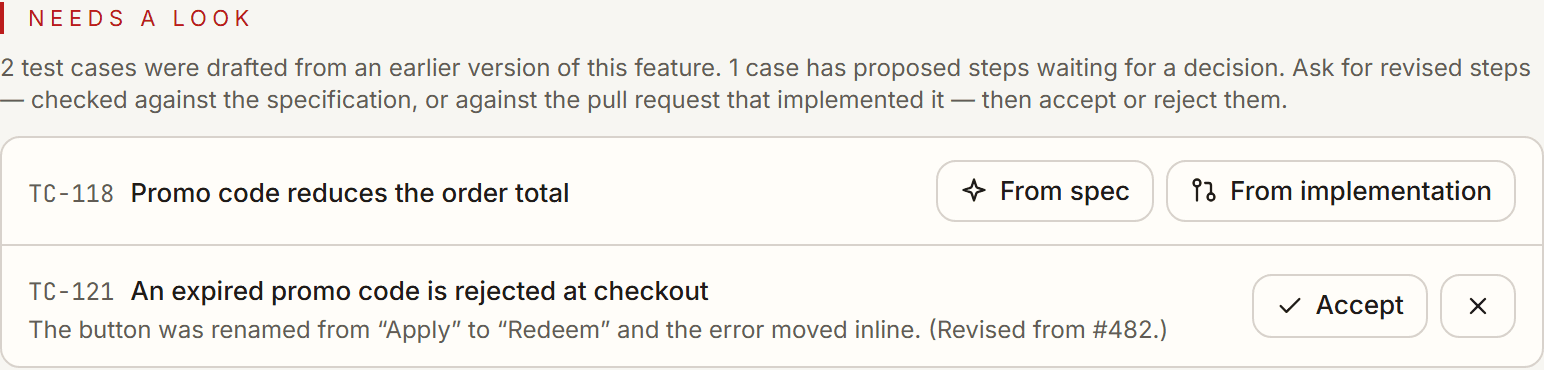
Ask for revised steps two ways, and the difference matters:
- From spec re-drafts the case against the current specification — the right choice when the requirements changed and the case should follow them.
- From implementation re-drafts it against the diff of the pull request that implemented the feature — the right choice when the build settled details the specification never named, like a renamed button or an error that moved inline.
A case revised from the implementation is deliberately not marked as matching the current spec, because it was never checked against it. It stays in this section until you revise it from the spec too, or accept that it describes what was built.
The same action appears on every row of the Test cases list, where it is labelled Revise — the rows there are narrow, and the full wording would crowd out the case title. It is the same control with the same tooltip, and it can be asked of any case, including one you wrote by hand.
Either way you get proposed steps, not a rewrite: accept them and the case changes, reject them and it doesn't. This section renders nothing when nothing has drifted, so its presence always means there is something to decide.
CI results and history
On wide screens these sit in a right-hand rail beside the matrix; on narrow ones they stack underneath.
- Pipeline results — the CI runs that touched this feature's cases, with Run tests and Sync now.
- History — every QA analysis and every drafting run over this feature, newest first, so you can see what produced the current picture. The dialog behind it lists them as QA analyses.
Sign-off
If your project requires approvals, the sign-off section collects them here, next to the evidence they are about.
It renders nothing when the project requires no approvals — an empty approvals section would imply a step that does not exist.
Next steps
Test Cases
Author test cases with ordered steps, sync them to your PM tool, group them into plans, link them to the work they verify, and let the project AI use them as context.
CI Test Results
Pull automated test results from GitHub Actions, GitLab CI, and Azure DevOps into Fabric, link them to your test cases, and see what broke without opening your CI dashboard.